

It’s quite easy To Post More Than 10 Photos on Instagram. But you need to understand first. For that, let’s get it to the blog.

With billions of users, Instagram is the most active Social Media Platform. Here, we often share our valuable moments and cherish them forever. This platform always updates its features to become more user-friendly.
On 8th August 2024, Instagram declared that a user could post more than 10 photos or videos in a single post on this platform. A user can upload up to 20 photos in a single post. But the question is, how to post more than 10 photos on Instagram?
While introducing new features every day, Instagram wants to create more space for their users, making this platform a safe house for your memories.
Previously, Instagram allowed users to post only 10 photos or videos on a single carousel post at a time. Recently, Instagram updated its photo-posting limit to a single post from 10 to 20. It’s very helpful to those users who use this platform as a multipurpose platform.
This feature is very helpful to those who want to grow as a brand or use this platform to increase their brand value. They can use this version to promote their various product in a single post. With more space to represent your product, you might reach a wider crowd and get more engagement.
How To Post More Than 10 Photos on Instagram?
If you are uploading photos on your Instagram platform on a daily basis and are familiar with the multiple photos feature, then you are one step ahead to reaching your goal. To upload 20 photos in a single post, your app should be updated to its latest version.
If your app is updated, and you are still facing problems regarding more than 10 photo uploads, then this feature is not available in your country now. So, wait for a little bit till the feature reaches you.
Steps To Follow
- Open Instagram on your device
- Press the plus icon [+] at the bottom in the middle.
- Press the ‘Select Multiple’ option.
- Now, select 20 photos you want to upload from your gallery.
- You can adjust the order of the images you want to share, or you can readjust them by pressing and dragging them as you wish.
- If you are certain about the order, then press the ‘next’ option and add a catchy caption and trendy hashtags. Here, you can tag people and add locations.
- Lastly, tap the ‘share’ option to upload your post.
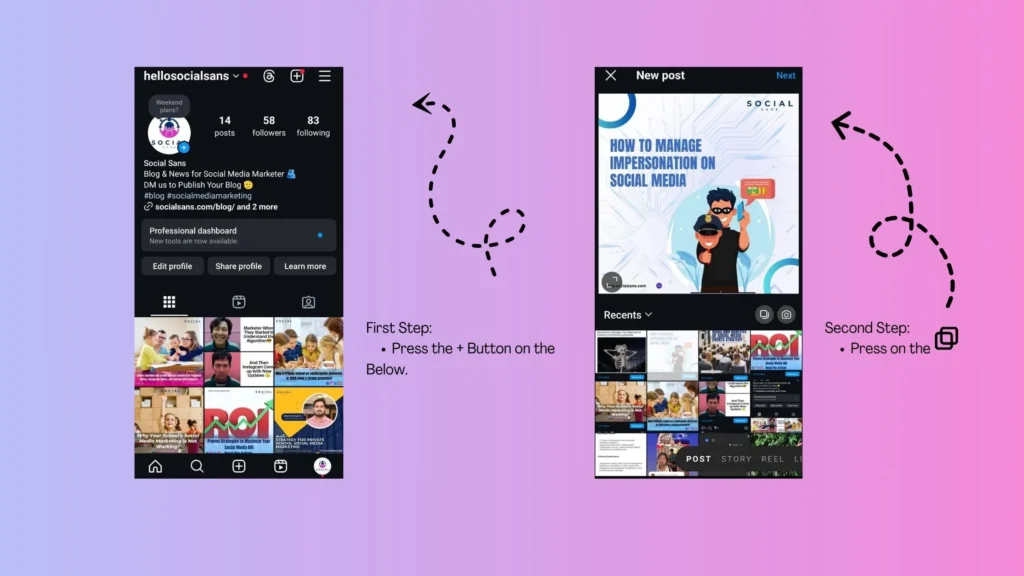
Open Instagram on your device:
To post more than 10 photos, you will need an up-to-date version of Instagram. So, if you are an active user, then just open the app and get started.
Press The Plus (+) Icon
After opening the Instagram app, press the plus (+) icon at the bottom in the middle. Where you can find your plus (+) icon depends on which version of Instagram you are using. I suggest using the updated version.
Press The ‘Select Multiple’ Option
Tap on the ‘select multiple’ option, where you see more than one photo, like a square. Once you press this option, you will get to select photos from your gallery. Here, you can select up to 20 photos. Then, press the Next button.
Adjust The Image by Order:
If you want to just upload more than 10 photos, you can select them and upload them. But if you want to tell a story through your content, you must select your images or videos in the order in which you want to present them. Each selected image or video will show a blue circle with a number on it. The number is the order in which they were selected. You can always change the order. If you are satisfied with your selection, then proceed to the next step.
Rearrange the Images as you want:
Double-check the images or videos that you want to upload to Instagram. If the order is as you prefer, then directly press the ‘Next’ button. But if you’re going to rearrange the images or videos, arrange them by tapping, holding, and dragging as you want. If you want to state your opinion through your content, your uploaded images should reflect your thoughts. So choose them wisely. But if it’s just a casual post, you can upload these pictures as you want to show them.
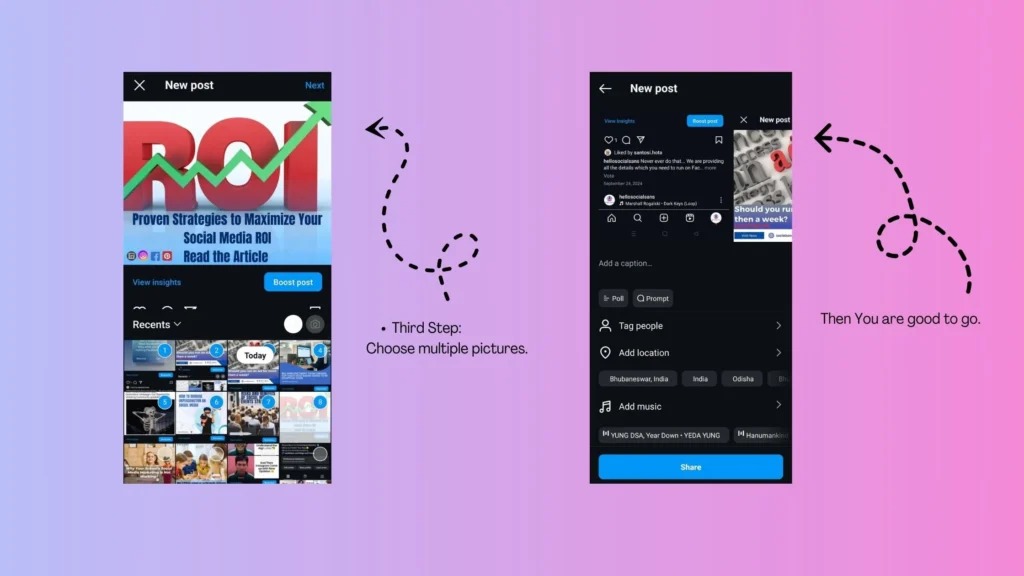
Share Your Post:
The final and last step is sharing your post. When we share a post on this platform, we want to get more engagement, more comments, and more shares. In other words, we want to reach out to a greater audience. To create a better Instagram presence, before posting any post on Instagram, you must add a caption, add some trendy hashtags, tag people, add a song that suits your post, and set a location. Then, you are all set to share your post by tapping the ‘share’ button.
Benefits Of Multiple Posts:
- Now that the photo limit has reached 20, it will be helpful for users to post more information through a single post.
- More content ensures more screen time, which will help boost engagement. In this way, your brand value will increase.
- If you are a content creator and use this platform as a path to reach your goal, then this ‘Multiple post‘ feature is surely beneficial to you as you can represent your content with more detail and from every possible angle.
Latest Techniques for Instagram Carousels
A new feature has been introduced by Instagram, where any individual can add text to a photo without any help from a third-party app. It will be easy to add text, titles, and descriptions to each image of the carousel post.
Benefits of the Built-in Text Feature
- Users can now directly add captions or instructions to each photo of the carousel.
- Users can now directly edit images within the Instagram app; there is no need to use a third-party app.
- If every post is written with clarity, then the chance of people’s engagement will increase.
- This feature is ideal for product showcases, content creators, and any tutorial purpose.
If you using Instagram for business purposes, this feature is really important for you. You can now directly attach any label to the image so that you don’t have to worry about writing long captions.
How Many Images Can You Post in A Day?
Normally, there is no limit to how many photos you can post in a day. You can post frequently if you want, but sometimes, posting randomly can affect your account negatively. To ensure a better online presence, you will need a quality product a relevant content, which will increase your brand value.
So, select your content cautiously and represent it with a proper caption because ‘Quality matters more than Quantity.’
How to Upgrade the Quality of Your Post:
To get more engagement in your post, you must maintain a certain quality of your product.
- Make every post with clarity. If you know what you want to deliver to your viewers, then every post must be relevant.
- By using various editing tools, you can upgrade the image quality.
- Using the built-in feature of Instagram can help you boost engagement.
- Add a catchy caption that complements your post.
Problems We Faced Regarding Multiple Posts
The most common problem regarding multiple posts is that Instagram has increased its carousel post limit to 20. But this feature is not available everywhere at the same time. This is usually because the feature is not available in all the countries at the same time.
Now if you want to see How Long Can a Video be on Instagram?
FAQ Section
How to Put More than 10 Photos on Instagram?
Answer: To post more than 10 photos on Instagram, create a carousel post where you can upload up to 20 photos in a single post.
What are The Steps to Follow to Post up to 20 Photos on Instagram?
Answer: To create a carousel post of 20 photos
- Tap the (+) plus icon.
- Select the ‘Multiple photo’ icon (Stacked square), which has a photo-like structure.
- Then, select the photos from your gallery and adjust them with your preferred order by tapping and dragging. Tap to the ‘next’ button.
- To enhance the picture quality, you can add a filter, and if not needed, add a suitable caption and share it.
Is Instagram Only Allowed to Post 10 Photos at a Time?
Answer: On 8th August 2024, Instagram stated that users could post more than 10 photos or videos in a single post.
Why can’t I Post More than 10 Photos at a time on Instagram?
Answer: If you are having trouble uploading more than 10 photos at a time, then your app is not updated, or this feature is not available in your area.
Pingback: CAN PEOPLE SEE WHEN YOU SCREENSHOT THEIR INSTAGRAM STORY? [ It's 2025😉 ] - creativity meets strategy in the digital realm